
Malwarebytes - Mobile Security
MalwarebytesTools
4.443.75K Reviews
- Version
- 5.34.0+592
- Installs
- 50.00M
- Age Rating
- Everyone
Screenshots

Our Review of Malwarebytes - Mobile Security
 Analysis by Appyee
I tend to notice mobile security most when I’m doing something ordinary: opening a message link, installing a new app, or joining a network away from home. Malwarebytes Mobile Security is meant to add a layer of protection around those habits, and its clearest appeal is that it brings security and privacy tools together in one place. I’d treat it as a useful helper, not a substitute for careful decisions or the protections already built into a phone.
When the connection matters
Some of the app’s most relevant protections naturally come into play while you’re connected. Safe browsing is aimed at steering you away from known phishing sites and other web dangers, so it is most useful when you follow links or search from your phone. That does not make every page safe, and I still pause before entering a password or payment detail after following an unexpected link. A warning is a prompt to stop and reassess, not a reason to assume every unflagged page is trustworthy.
Connectivity also affects what I expect from a security tool. Checking a site or getting current protection information can depend on a working connection, while a scan of items already on the device is a different kind of task. I would not plan around this app as though every protection works identically on a subway ride with no signal and on home Wi-Fi. My practical approach is to review its status while connected, then keep the same cautious habits when reception drops.
Built for the way phones travel
A phone moves between home, work, public Wi-Fi, and mobile data in a way a desktop often does not. That makes a mobile security app most useful when it fits into routines rather than demanding constant attention. The dashboard gives you a place to check the device’s security status, and the privacy audit can help you revisit permissions after installing something new. I find that second task especially worthwhile because permissions are easy to approve quickly and forget about later.
For example, imagine downloading a utility while waiting for a bus, then using a link in a message to check a delivery update. I would use the scan and browsing protections as extra checks, but I would still confirm that the utility came from a source I trust and that the delivery message is genuine. The app can help surface risks; it cannot tell me whether a request makes sense in the context of my day.
What to do when a check raises a concern
A warning is useful only if you know how to respond. If Malwarebytes flags an app or a web destination, I would avoid opening it while I work out what triggered the alert. For an app, I’d consider where I got it and whether I actually need it; for a link, I’d navigate to the organization’s site independently instead of returning through the message. This is a safer recovery habit than repeatedly tapping a warning to see whether it goes away.
The privacy audit is also a practical follow-up tool rather than a one-time fix. After adding apps for travel, shopping, or a short-term task, I’d look through the permissions and reconsider anything that seems unrelated to the app’s purpose. It won’t make a questionable app trustworthy, but it can help you spot access you no longer want to allow. Security is partly a matter of reducing unnecessary exposure, not only detecting threats.
Keeping protection in perspective
Malwarebytes is a free tools app from Malwarebytes, with optional in-app purchases priced from $1.49 to $139.99 per item. It is rated for Everyone, has an average rating of 4.5 from around 600,000 ratings, and has been installed over 10 million times. The app first appeared on October 15, 2013; version 5.20.0+505 supports devices running Android 9 or later. Those details make it a well-established option, but popularity alone cannot tell you whether its approach suits your phone or your tolerance for extra security software.
Compared with relying only on a phone’s built-in protections, a separate app can give you a more focused place to review app risks and privacy permissions. Compared with installing several specialist tools, a combined security app may be easier to manage, though someone who wants only basic safe-browsing habits or permission control may prefer to use their device’s existing settings instead. I would also think twice about adding another security layer if I already have overlapping tools: duplicate alerts and repeated checks can create friction without making every decision safer.
Choosing the right level of involvement
I’d recommend it most to people who install apps regularly, follow links on their phones, or want a clearer routine for checking permissions. It may be less suitable if you expect a security app to make risky browsing harmless, or if you prefer to keep the number of background tools on your device to a minimum. The free option makes it possible to start without paying, while purchases are available for people who decide they want more; I would first work out which protections I actually need rather than upgrading simply because a premium tier exists.
One useful habit is to check the dashboard after installing an unfamiliar app, then revisit the privacy audit once you have used it long enough to know what access it genuinely needs. If you see a concern, pause, investigate, and remove or restrict what you do not trust. That small routine is more practical than expecting any single scan to settle every security question.
How it fits into everyday security
First things first, getting Malwarebytes Mobile Security set up on my phone was a breeze. A quick download from the app store, a couple of taps, and voilà, I was ready to roll. The setup wizard is straightforward, guiding you through the necessary permissions without overwhelming you with tech jargon. If you’re anything like me, you’ll appreciate the simplicity.
Exploring the Features
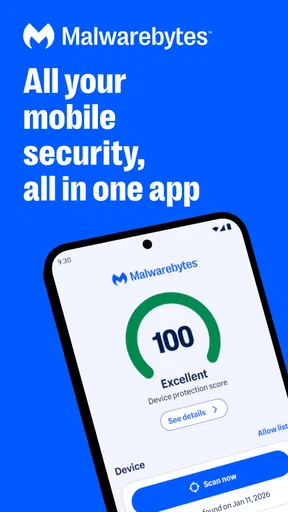
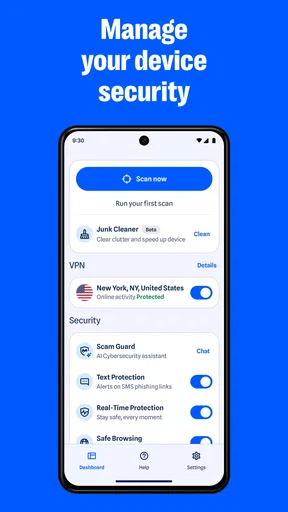
Once you’re in, the app presents a clean, easy-to-navigate interface. The main dashboard gives you a snapshot of your device’s security status. From here, you can dive into its features:
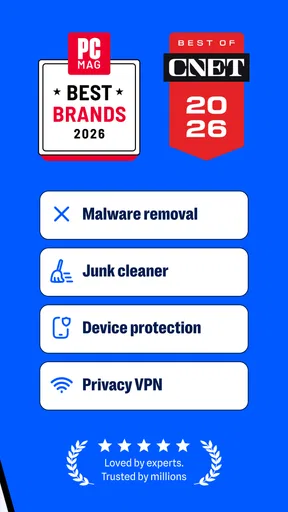
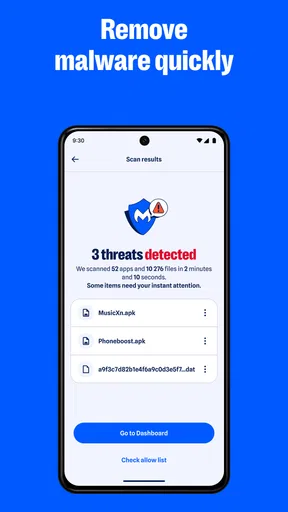
- Real-time Protection: This is your frontline defense against malicious apps and files. The app scans every download and keeps an eye out for anything fishy.
- Privacy Audit: Ever wonder what permissions your apps are using? This feature lists them out, so you can decide if that flashlight app really needs access to your contacts.
- Safe Browsing: If you’re prone to wandering the web, this will help keep you away from known phishing sites and other dangers lurking online.
Performance and Usability
Now, let's talk about performance. Does it slow down your device? Thankfully, no. I ran some demanding apps while Malwarebytes did its thing in the background, and my phone didn’t miss a beat. The scans are quick, and the app is lightweight, ensuring that you won’t even notice it’s there—until you need it, of course.
Usability-wise, the app is designed with the user in mind. Even those who aren’t tech-savvy will find it easy to navigate. The alerts are clear and concise, so you won't be bombarded with cryptic messages that leave you scratching your head.
Does It Deliver?
So, does Malwarebytes Mobile Security deliver on its promises? In my experience, absolutely. It provides a robust layer of security without being intrusive. The peace of mind knowing that your data is safe is worth the download alone.
However, it's important to remember that no security app can protect you 100% of the time. It’s always a good idea to be cautious about what you download and the sites you visit. That said, having Malwarebytes in your corner is like having a digital bodyguard who’s always on duty.
Final Thoughts
In a world where cyber threats are becoming increasingly sophisticated, having a reliable security app is no longer optional—it's essential. Malwarebytes Mobile Security offers a comprehensive suite of tools to keep your device safe without compromising on performance.
If you’re still on the fence, give it a try. The app offers a free version with essential features, and if you feel like stepping up your security game, there’s a premium version with more bells and whistles. Either way, you’ll be taking a proactive step towards a safer digital life.
Privacy and Permissions
See what permissions an app requests and how it handles your data.
- Contacts
- read your contacts
- SMS
- read your text messages (SMS or MMS), receive text messages (MMS), receive text messages (SMS), receive text messages (WAP)
- Photos/Media/Files
- read the contents of your USB storage, modify or delete the contents of your USB storage
- Storage
- read the contents of your USB storage, modify or delete the contents of your USB storage
- Wi-Fi connection information
- view Wi-Fi connections
- Other
- view network connections, full network access, run at startup, draw over other apps, prevent device from sleeping, Google Play license check
Verdict
Strengths of Malwarebytes - Mobile Security
- Effective malware detection and removal.
- User-friendly interface for easy navigation.
- Real-time protection against threats.
- Frequent updates ensure security.
- Low impact on device performance.
Limitations of Malwarebytes - Mobile Security
- Limited features in free version.
- Occasional false positives.
- Ads in free version can be intrusive.
- Some features require a premium subscription.
- Initial setup can be slightly complex.
Similar Picks in This Category
View All
Google LLC4.0

Gboard - the Google Keyboard
Google LLC4.5

Google Play services
Google LLC4.3

Google Play Store
Google LLC4.9

Files by Google
Google LLC4.5

SHAREit: Transfer, Share Files
Smart Media4U Technology Pte.Ltd.4.3
Frequently Asked Questions
What features does Malwarebytes Mobile Security offer?
Malwarebytes Mobile Security provides comprehensive protection against malware, ransomware, and malicious apps. It includes features like real-time scanning, privacy audits for apps, and safer browsing with protection from phishing sites. Additionally, it offers security reports and alerts for suspicious activity, making it a robust solution for mobile security.
Is Malwarebytes Mobile Security free to use?
Malwarebytes Mobile Security offers a free version with basic features such as malware scanning and protection. However, to access premium features like real-time protection, scheduled scans, and anti-ransomware, users need to subscribe to a paid plan. The app often provides a free trial for premium features to let users test them before committing.
How does Malwarebytes Mobile Security impact device performance?
Malwarebytes Mobile Security is designed to run efficiently in the background without significantly impacting device performance. It uses minimal resources to conduct scans and provide real-time protection. Users generally report a smooth experience without noticeable slowdowns, ensuring that your device remains fast and responsive.
Is Malwarebytes Mobile Security easy to use for beginners?
Yes, Malwarebytes Mobile Security is user-friendly and suitable for beginners. The app features a clean, intuitive interface with straightforward navigation. Setup is quick, and the app provides clear instructions and alerts, making it easy for users of all skill levels to understand and use the app effectively.
How reliable is Malwarebytes Mobile Security in detecting threats?
Malwarebytes Mobile Security is highly reliable in detecting and removing threats. It employs advanced algorithms and regularly updates its database to recognize the latest malware, ransomware, and other malicious threats. Independent testing labs frequently rate it positively for its strong detection capabilities and efficient threat removal.
